Video review and approval
Video review, down to the frame.
Upload a cut and send the link. Notes come back on the exact frame, drawn on the picture, with a name on every one.
Little Things by Lance Blanchard
23.976 fps
00:01:49:07·Review
The picture, and every note on it.
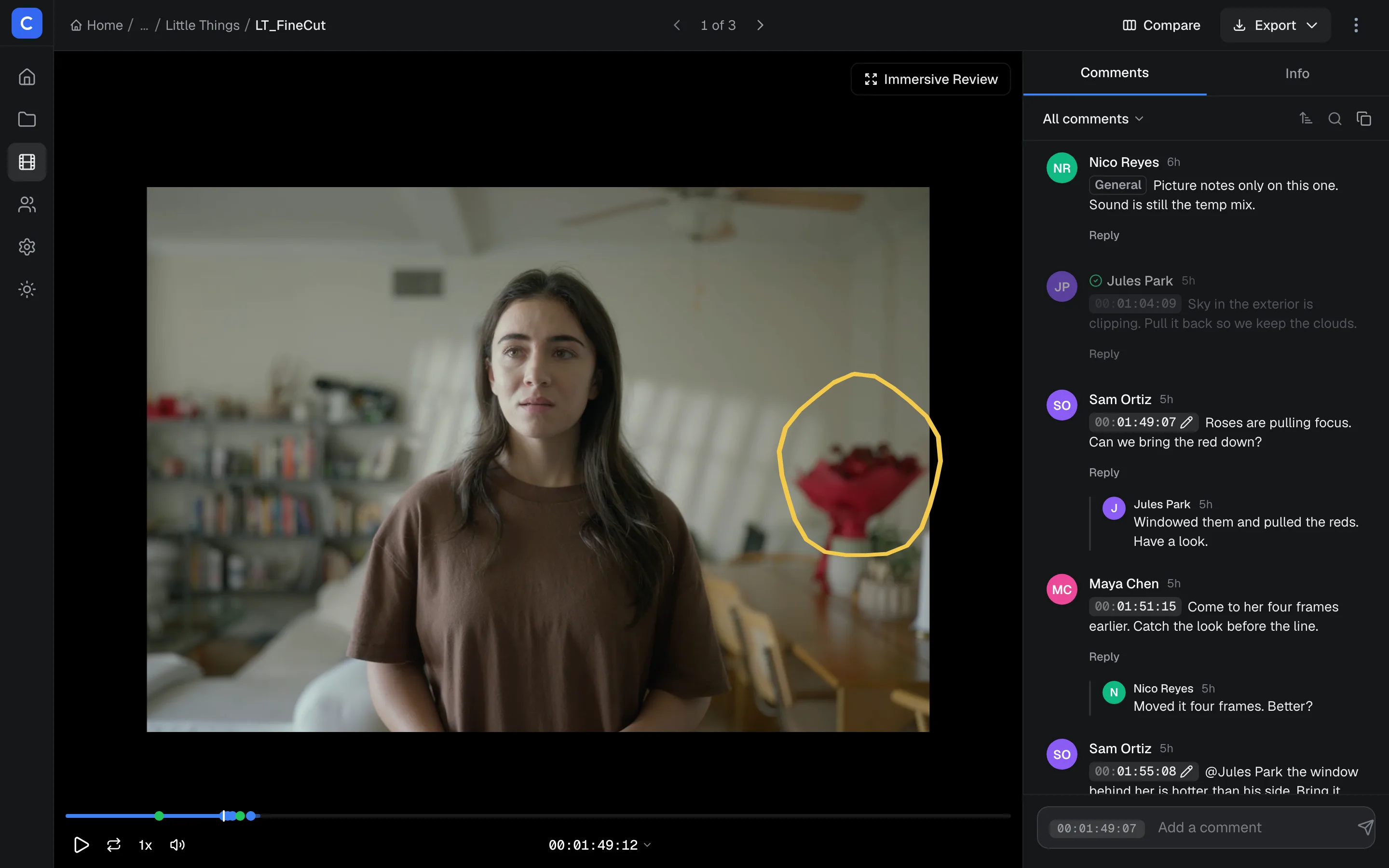
- Frame-accurate
- SMPTE timecode at the clip's own frame rate, on every note.
- Drawn on the picture
- Pen, arrow, box or line, saved with the note it belongs to.
- Keyboard-first
- J, K and L to shuttle. Arrow keys step a frame when paused.
00:01:51:16·Comments
Mark the frame.
00:03:40:17·Collaboration
Talk it through.
00:07:30:00·Approval
Sign it off.
00:09:14:22·Sharing
Send it out.

00:10:02:09·Security
Private by default.
- Every reviewer signs in
- Share links open after Apple or Google sign-in, so every note has a name on it.
- Forensic watermarking
- Each viewing session carries its own invisible mark, so a leaked frame traces back. Turn it on per project.
- Private storage
- Originals sit in private storage and play through signed links that expire.
00:11:48:12·Specs
Everything in the box.
- Uploads
- Video, stills, audio or PDF, up to 5 GB a file.
- Timecode
- SMPTE at the clip's own frame rate.
- Comments
- On a frame, a range or the whole video, with drawings and replies.
- Review
- Approve, request changes or reject, per reviewer, per version.
- Versions
- Stack a new cut on the last one and compare them side by side, in sync.
- Each new comment as it comes in, or one digest a day.
- Export
- Every comment as CSV, plain text or JSON.
- Devices
- Any desktop browser, and phones, drawing included.
00:12:24:00